Dishwasher won't start
A dishwasher that won't start is usually stuck on a setting or not getting power, not broken. A door that isn't fully latched, a control lock or delay-start timer that's switched on, and a tripped breaker or GFCI cause most of these. Turning the power off for a minute clears a lot of control glitches too. A failed door switch or control board only comes into it after those checks. Most dishwashers that won't start are fine. Check the latch, the lock and the power before buying parts.


How a dishwasher decides to start
A dishwasher won't run unless its door latch closes a switch that tells the control the door is shut. On many models with the buttons on the top edge of the door, you also have to pick a cycle and press Start, then close the door within a few seconds, or the cycle cancels. Control lock, sometimes called child lock, and delay start can make it look dead even when it's fine.
Power usually comes from its own circuit. The dishwasher is either plugged into an outlet under the sink or wired into a small junction box behind the lower front panel. In many kitchens a wall switch next to the sink, often beside the garbage disposal switch, controls that power, and it's easy to flip off by mistake. A outlet or GFCI breaker on that circuit can also trip and cut it off.
Why dishwashers won't start
Something blocks it, or the latch is worn.
Control lock, delay start or a demo mode.
A tripped breaker or GFCI, or the wall switch is off.
The door switch, a or the control board.
| You notice | Likely cause | Start at |
|---|---|---|
| Nothing happens when you press Start | Door not fully latched | Step 1 |
| A lock symbol is lit | Control lock is on | Step 2 |
| A timer or clock is counting down | Delay start is set | Step 2 |
| Buttons don't respond at all | Frozen control | Step 3 |
| Panel is completely dark | No power | Step 4 |
| Lights blink in a pattern | Error code | Step 5 |
| Panel lights but it never runs | Door switch | Step 6 |
Let's fix it
- Close the door until it clicksPush the door firmly shut and listen for the latch to click. A pan handle, utensil or rack that isn't pushed all the way in can stop it a fraction short. Look at the latch on the top of the door and the strike on the tub for anything bent or broken. If the buttons are on the top edge of the door, choose a cycle, press Start, and close the door within a few seconds.

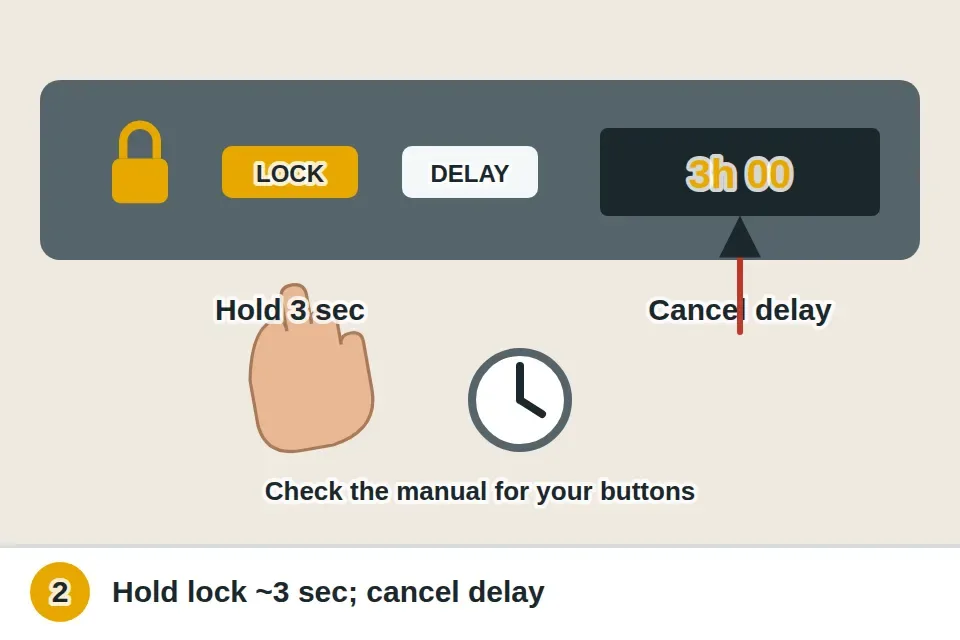
- Turn off the control lock and delay startLook for a lit lock symbol or the words Control Lock or Child Lock. On most models you hold the lock button, or the button marked with the lock, for about 3 seconds to turn it off; the manual gives the exact button. Check for a delay-start light or a countdown in the display, and cancel it. Some models also have a showroom or demo mode that lights the panel without running, which the manual explains how to exit.
- Reset the powerTurn off the dishwasher's breaker, or unplug it under the sink, and leave it off for at least a minute. Turn it back on, wait a moment, then choose a cycle and start it. This clears a lot of frozen controls. Many models also have a cancel or reset sequence, often holding Start or Cancel for a few seconds, listed in the manual.

- Check the breaker, GFCI and wall switchAt the panel, look for a tripped breaker for the dishwasher and push it fully off, then on, once. Press Reset on any GFCI outlet under the sink or nearby on the counter. Check the wall switch beside the sink; one of those switches may run the dishwasher instead of the disposal. If it plugs in under the sink, test that outlet with a lamp or tester. If the breaker trips again, leave it off and call for help; there's a separate guide for a circuit breaker that keeps tripping.

- Look for an error code or blinking lightsMany dishwashers flash a code or blink a pattern of lights when something stops them. Find the model number on a label along the edge of the door or the side of the tub, and look the code up in the manual or on the maker's site. Codes often point to the door switch, the water supply, or the leak sensor. If there's water in the base under the tub, the leak sensor or float may keep it from starting until the base is dry and the leak is fixed.

- Test the door switchIf the door latches, the power is on and the panel lights but nothing runs, the door switch may have failed. Turn off the breaker and confirm the power is off with a voltage tester. Remove the screws on the inside edge of the door to reach the latch assembly, unplug the switch wires, and check the switch with a multimeter set to continuity while you press the latch closed. If it doesn't read closed when latched, replace the latch assembly with the exact part for your model. If the switch is fine, the control board or a thermal fuse is the likely cause, and a repair tech can confirm which.

Watch it done
- Pressing Start begins a cycle
- You hear water filling within a minute or two
- No lock or error lights are showing
If it starts but has other problems
If it starts but leaves water in the bottom, we have a guide for a dishwasher not draining.
If it runs but the dishes come out dirty, see the guide for a dishwasher not cleaning.
What a pro typically charges (a rough estimate; prices vary by area): An appliance repair visit typically costs $100–$200 to diagnose. Replacing a door latch assembly usually runs $150–$300 with the part, and a control board $250–$500 or more, which is when replacing an older dishwasher is worth comparing.
Find appliance repair near youSomething else going on?
Dishwasher won't start questions
Why won't my dishwasher start?
Usually the door isn't fully latched, the control lock or delay start is on, or it has no power from a tripped breaker, GFCI or wall switch.
How do I reset my dishwasher?
Turn off its breaker or unplug it for at least a minute, then turn it back on. Many models also have a reset button sequence in the manual.
How do I turn off the child lock on a dishwasher?
On most models, hold the lock button for about 3 seconds until the lock symbol goes out. Your manual names the exact button.
Why does my dishwasher have lights but won't run?
The door switch may have failed, or there's an error code. Look up any blinking pattern in the manual before replacing parts.